

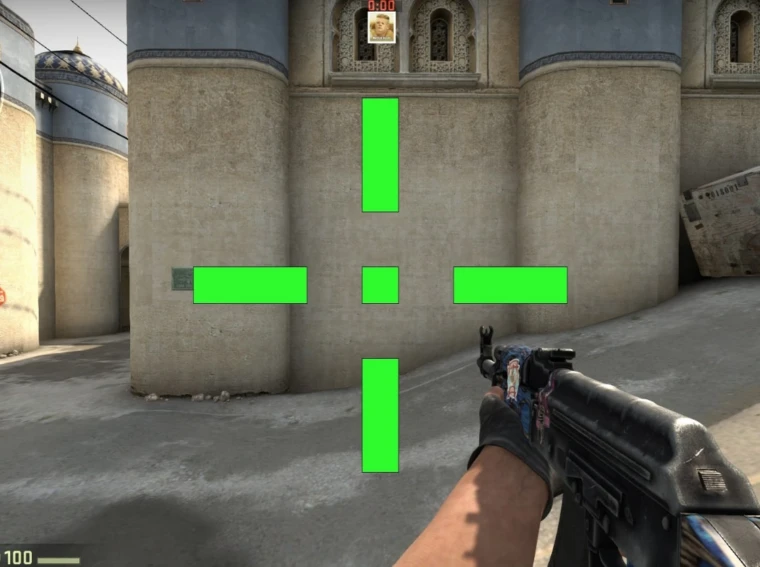
The crosshair in CS2 is more than just a symbol on the screen. It’s the player’s primary tool, an extension of their vision and, in a sense, their trigger finger. Beginners often search for a magic code from some top pro player, naively believing that by copying s1mple or ZywOo’s settings, they’ll immediately start hitting their targets. This is a grave misconception. Professionals spend years honing their settings, tailoring them to their unique playstyle, monitor resolution, usual viewing position, and even room lighting. Their settings are the result of fine-tuning, not a starting point.
Where Does the Crosshair Begin?
It all starts not with numbers, but with an understanding of fundamentals. Color, shape, and the presence of an outline—these are the foundations that are chosen once and then rarely changed. Let’s take this step in order:
- Color. This is purely a matter of personal visibility. Green (classic) and cyan are the most popular because they contrast with most maps. Yellow and red can blend in with fire or blood splashes. Many players use a combination of a bright crosshair color and a black outline for better readability on different maps. A dynamic crosshair can be useful for beginners, as it visually displays the spread and helps them better understand the shooting mechanics. However, at higher levels of play, static crosshairs are often preferred, relying on muscle memory and recoil control.
- Form. The classic crosshair is the most common. A dot or a small crosshair with a dot in the center requires particular precision and practice. Some players use a gap in the center to avoid blocking enemy headshots at a distance.
- Outline. The black outline around the crosshair lines is a double-edged sword. On the one hand, it dramatically increases contrast against any background. On the other hand, it makes the crosshair visually thicker and can slightly obscure the target. Many experienced players use minimal reticle thickness or eliminate it entirely, relying on the contrast of the reticle color.
Fine-tuning: Numbers That Matter
This is where the magic begins. All parameters in the console influence each other. When changing one, you need to check how it interacts with the others:
- The length of the crosshair. Those that are too long can obscure the field of view. Those that are too short can be difficult to see with your peripheral vision in a fast-paced firefight. A small but clearly legible crosshair is most often used. The key is that it shouldn’t interfere with seeing where bullets are landing when firing in bursts.
- Thickness. A thin crosshair is accurate, but can get lost while moving. A thicker crosshair is more visible, but less convenient for precise aiming. You need to find the sweet spot where the crosshair remains a precise pointer but doesn’t blur into a blur.
- Gap. The distance from the center of the screen to the beginning of the crosshair lines. A zero gap creates an intuitive center, but with thick lines, it can visually obscure the aiming point. A crosshair of -2 or -3 results in overlapping lines and a more pronounced visual center. A positive crosshair (2-4) leaves a clear dot in the center, convenient for accurate shots but requires practice. Professionals adjust the crosshair to clearly see the opponent’s head at the distance where duels most often occur in their favorite position.
- Dynamics. Dynamics determines whether the crosshair changes while moving and shooting. The dynamic option displays weapon spread and is more often used for training, while the static option remains constant and provides a stable, predictable aiming point, making it preferred by experienced players. The recoil-following mode is rarely used and mainly serves as a training aid. Crosshair CS2 settings affect visual readability only and do not influence shooting mechanics.
How the Pros Experiment: Practice Over Theory
CS2 pro players don’t spend hours in the menu. Their process looks like this:
- Start from a known point.
- Head to pre-fire maps.
- Test against bots.
- Long session in Deathmatch. Deathmatch is a testing ground. 30-60 minutes of fast-paced, shootout-heavy play reveals all the game’s flaws.
- Using helper tools. To quickly cycle through options and visualize changes, many use a CS2 crosshair generator.
Conclusion
A player’s crosshair isn’t a secret setting, but a perfectly fine-tuned tool. It should be noticeable but not intrusive, precise but persistent, informative but not distracting. The whole process is a process of trial and error. Today you might make it thinner, tomorrow you might add a contour, and the day after you realize you need more clearance. Don’t blindly copy the settings. Use them as a starting point, experiment, and listen to your own feelings. When you stop noticing the crosshair as a separate object and start perceiving it as a natural part of aiming, you’ve found your solution.