

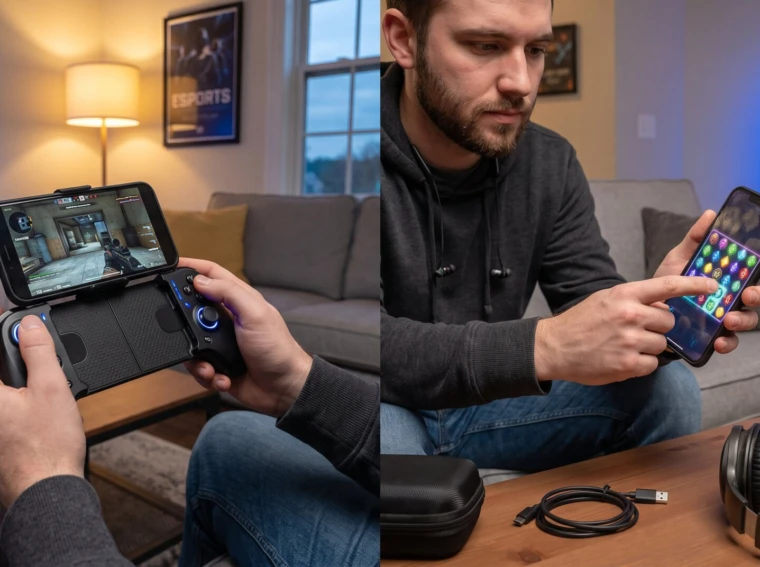
Mobile Controllers vs. Touch Controls is the central choice every mobile gamer faces in 2026. The decision changes aiming precision, comfort during long sessions, and whether a player competes or casually plays. This article gives direct, practical comparisons, when touch wins, when controllers win, and how to reduce common problems so players get the best experience for their favorite genres.
Key Takeaways
- Choosing the right control method in mobile gaming directly affects aiming precision, comfort, and performance, especially in competitive titles.
- Mobile controllers provide enhanced precision and ergonomics with analog sticks and triggers, reducing input errors and wrist fatigue during long play sessions.
- Touch controls excel in casual and quick-access gaming, offering universal compatibility and instant play without setup or extra hardware.
- Mitigate touch control drawbacks by customizing HUD layouts, enabling sensitivity adjustments, and using two-thumb layouts to reduce mis-taps and fatigue.
- Before purchasing a mobile controller, verify game compatibility and prioritize models with low latency and firmware updates for optimal performance.
- For most players, combining touch controls with a compact mobile controller setup offers flexibility across different game genres and play scenarios.
Why Control Choice Matters For Mobile Gaming
Fact up front: control choice changes win rates and fatigue. In competitive shooters and fast-action titles, players using physical analog sticks and triggers typically land shots and complete maneuvers more consistently than those relying only on touch.
Why that matters: analog input gives gradual movement and tactile stops: touch gives absolute, direct taps. For example, a player aiming on a touch screen must rely on finger dexterity and often gyroscope aiming, which can be accurate but inconsistent across sessions. Conversely, a mobile controller user gets repeatable stick travel and trigger feel that reduce aiming variance.
Practical impact: esports players and serious hobbyists find that controller setups cut input errors and reduce wrist strain during two-plus hour sessions. Casual players, testers, and puzzle fans prioritize instant access and portability, so they stick with touch. ThePortableGamer covers setup trade-offs across devices: hobbyists who want a compact primer can consult the site’s resource hub for deeper travel-and-handheld advice.
Warning: choosing the wrong control method for a game can turn a fun session into frustration, awkward touch layouts cause missed taps, while an unsupported controller wastes time pairing and mounting. Match controls to goals: speed and accessibility for casual play, precision and ergonomics for competitive play.
Touch Controls: How They Work And When They Shine
Answer first: touch controls use taps, swipes, drags, and on-screen virtual sticks so a player interacts directly with the UI. They excel when the game design expects direct contact and quick menu navigation.
Touch is immediate. A casual gamer launching a match-three puzzle or a card game can start playing in five seconds with no hardware. Touch controls also let developers place context-sensitive buttons and adapt layouts dynamically: many mobile strategy and idle games let players resize or relocate buttons to preferred zones.
When they shine:
- Puzzle and card games: direct tapping is faster than mapping actions to button combos.
- Runners and many 2D arcade titles: simple taps and swipes map well to one-thumb play.
- Menu-heavy or inventory-driven games: direct touch gets players where they want quicker.
Sensory detail: imagine tapping a glowing rune in a puzzle, the finger feels the glass, the rune responds instantly. That tactile moment, even without physical feedback, is often satisfying.
Practical tip: players should enable custom HUD layouts and larger touch targets when available. Many developers include sensitivity sliders and multi-finger schemes to reduce mis-taps. Using a clean, matte screen protector can also reduce finger slip and improve consistent swipes.
The section below lists strengths and how to mitigate the most common issues.
Strengths Of Touch Controls
Fact first: touch controls deliver universal support and zero setup. Any smartphone runs touch input natively, so players can join a match instantly.
Concrete strengths:
- Universal compatibility: nearly every mobile title supports touch. No pairing, no firmware, no fuss.
- Portability: nothing extra to carry: a player can hop on a bus and play.
- Direct UI control: precise button placement for menus and inventory.
- In-game customization: games like ‘Genshin Impact’ or ‘Hearthstone’ often provide layout and sensitivity options that make touch comfortable for many routines.
Real example: a commuter who spends ten minutes between stops can finish a puzzle level faster with touch than by unfolding and pairing a controller. That immediacy is the tactile advantage.
Common Drawbacks And How To Mitigate Them
Answer first: touch lacks tactile feedback and can block the view, which causes mis-taps and fatigue during long sessions. But simple steps reduce those downsides.
Common issues and fixes:
- Mis-taps and precision limits: increase button size in settings or enable an alternate control scheme. Developers often include a sensitivity slider: lowering sensitivity for aiming tasks can help.
- Thumb obstruction: adopt a two-thumb layout or shift frequent buttons to screen edges. Holding the phone slightly higher reduces the visual blockage.
- Fatigue: take short breaks every 30–45 minutes, and change grip to rest thumb muscles.
- Weak timing for aim-heavy 3D movement: enable gyroscope aiming where offered. Gyro can convert wrist motion into micro-adjustments that mimic analog correction.
Honest note: many players tried pure touch in shooters and switched after frustrated sessions. The learning curve exists: mitigation helps, but for sub-100 ms reaction windows, touch often remains the weaker option.
Mobile Controllers: Types, Setup, And Advantages
Key fact: mobile controllers add physical sticks, triggers, and grips to improve precision and ergonomics. They come in several types and match different priorities.
Types and examples:
- Bluetooth gamepads: full-sized controllers that pair like a console pad. Good for long sessions and cloud gaming.
- Clamp/Backbone-style controllers: attach directly to the phone for a console-like feel: they fold for travel.
- Wired USB-C controllers: lowest-latency wired option for supported phones.
- Cloud-optimized controllers: ultra-low-latency units designed for remote streaming and competitive play.
Advantages:
- Precision: analog sticks and triggers let a player make micro-adjustments, useful in shooters and racing games.
- Ergonomics: grips and button layout reduce thumb strain in multi-hour sessions.
- Screen clarity: hands sit off the display so sightlines stay clean.
Concrete example: a racer who uses a clamp controller reports smoother steering inputs and fewer overcorrections during 20-minute races. That steadier control converts to better lap times.
Practical setup: pairing typically takes 30–90 seconds. Players should check firmware updates and map buttons in-game when possible. For travel, choose a foldable clamp or compact Bluetooth pad to reduce bulk.
Recommendation: readers comparing controllers can view curated lists and hands-on guides at Pocket Tactics to match models to needs: one up-to-date controller guide compares latency and ergonomics across current options.
Compatibility, Latency, And Practical Limitations
Clear fact: controllers are not universally supported and can introduce pairing friction and extra carry weight.
Compatibility details:
- Game support: many titles natively support controllers, but touch remains the universal fallback. A player might buy a controller only to find a favorite indie title lacks mapping support.
- Latency: typical Bluetooth latency sits near 40–60 ms on many inexpensive controllers. Premium models drop to 1–20 ms: wired USB-C and specialized cloud controllers can approach 1 ms in ideal conditions.
- Practical limitations: pairing steps, battery management, and mounting solutions add friction. Players must carry a controller, a small case, or a clamp.
Concrete numbers: in head-to-head tests, skilled players reported 10–30% faster corrective movements with low-latency controllers versus touch when tracking moving targets. That translates to fewer missed shots in shooters.
Workarounds and realities:
- Check official controller support lists before buying.
- Choose controllers with firmware updates and low-latency modes for cloud gaming.
- Use a travel case and quick-release clamp to reduce setup time.
Related site guidance: for travel-focused players who haul controllers and consoles, ThePortableGamer suggests protective measures and packing routines: see the post on protecting handhelds for practical tips on transport and storage.
Player confession: many switched from heavy Bluetooth pads to compact clamps after realizing they rarely needed full-size ergonomics during short trips, a small habit change that cut pocket bulk and setup time.
Conclusion
Direct answer: controllers generally win for competitive, precision-driven games: touch wins for casual, quick, and universally supported titles. Players should match control method to goals, not trends.
Final insight: try both. A short session with a controller and a separate touch-only run will reveal which suits a player’s reflexes and schedule. For travel and mixed play, a compact clamp plus optimized touch settings covers most needs.