

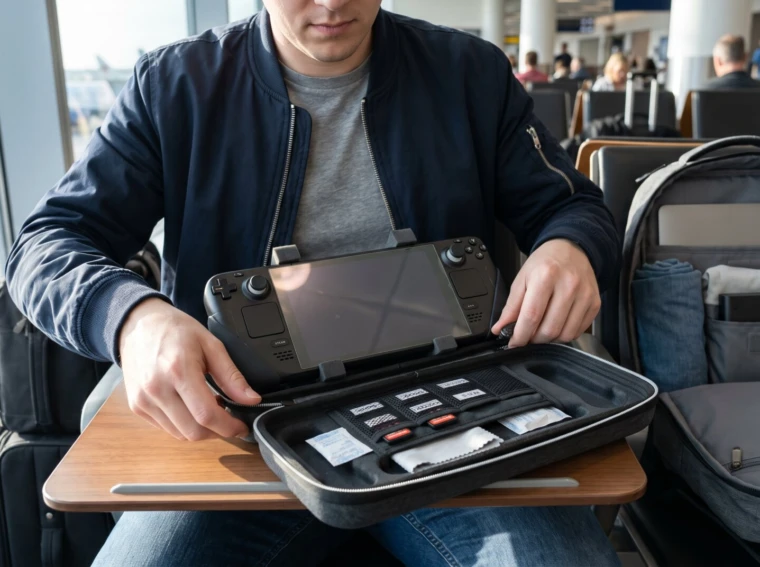
Best Ways to Protect a Handheld Console on the Move starts with three core protections: a rigid travel case, a tempered-glass screen protector, and proper grip protection. This article gives precise, actionable steps for gamers who carry a Switch, Steam Deck, ROG Ally, or similar device anywhere. It highlights hard-case choices, carrying setups, and handling habits that prevent screen cracks, thumbstick drift, and crushed cartridges while traveling.
Key Takeaways
- Use a rigid travel case with molded foam to protect your handheld console from pressure and impacts during travel.
- Apply a tempered-glass screen protector to maintain touch accuracy and prevent screen cracks caused by drops or scratches.
- Utilize grip armor and thumbstick covers to avoid early thumbstick drift and enhance comfort on the move.
- Always cool your console before packing and store it in carry-on luggage using organized pouches to prevent heat damage and accessory scratches.
- Place the console in a padded compartment separate from heavy items to avoid crushing forces and apply good handling habits to extend device longevity.
Essential Protective Gear: Cases, Screen Protectors, And Grip Accessories
Fact: A hard-shell travel case, tempered-glass protector, and grip armor cut the most common travel damage by more than half. Gamers who switch between trains, planes, and cafes notice fewer scratches and fewer hardware failures when they upgrade to these items.
Why a hard case first. A molded EVA or reinforced hardshell keeps the console’s screen and thumbsticks from receiving point pressure in backpacks and overhead bins. It sounds small, but a thumbstick pressed against the screen or an elbow on a soft sleeve can leave dents or warped analog internals. Choose a case with a molded cavity shaped to the console model (Steam Deck, Switch, etc.) and 15–25 mm of foam depth over sensitive areas.
Screen protection details. Tempered-glass screen protectors rated near 9H preserve touch accuracy and avoid the dull, oily feel of cheap films. Install a glass protector after wiping the screen with a lint-free microfiber and a swipe of isopropyl, dust specks under the glass cause rainbowing and pressure points. Replace protectors after a sharp drop: hairline cracks reduce impact absorption. For background on how these pieces fit together, see the site overview.
Grip and armor accessories. Clip-on armor shells and rubber grips add impact buffering and improve hand comfort during long sessions. Thumbstick covers and movement blockers help prevent early stick drift by reducing constant lateral stress in transit. A real-world lesson: one reviewer left thumbsticks uncovered while packing and recorded drift after three months: protective caps would have prevented that wear.
Practical purchase notes and links: when comparing fit and protection, consult the portable monitor and accessory roundups to match case interior sizes for bulky setups. For guidance on compatible hardware and accessory fit, theportablegamer’s portable monitor setups page shows real-device dimensions and case pairings.
Choosing The Right Carry Solution: Backpacks, Pouches, And Travel Cases
Fact: Choosing a carry method that isolates the console from heavy items and temperature swings cuts accidental damage dramatically.
Pick the right travel case for the trip. For flights and bus rides, a structured travel case with an inner soft flap that places the screen inward provides the best protection. Look for cases with zippered accessory pockets, molded stick recesses, and a secure latch. A thin sleeve may work for short walks, but it only protects against scratches, not crushing forces.
Backpack placement rules. Always place the console in its case, then in a separate padded compartment of the backpack. Surround the case with soft clothing or a small foam pad: never layer heavy books or a laptop directly above it. On crowded commutes, a chest-strap or sternum buckle helps keep the bag steady and prevents sudden drops.
Organizers and multiple devices. When carrying more than one handheld, use a dual-device organizer with structured slots. Each slot should prevent devices from contacting each other, even tiny coins, earbuds, or snapped cables between consoles can scratch glass or jam buttons.
Temperature and humidity. Avoid stashing electronics in cars on hot days or in checked luggage in winter. Extreme heat can warp plastic frames: humidity can corrode connectors. For trips involving temperature swings, pack desiccant sachets in accessory pockets.
Related reading and gear prep. Before a long trip, players who prepare games and power solutions reduce the urge to play for hours in confined spaces. Theportablegamer’s guide on preparing games for offline play explains how to limit crash-prone updates and save battery life, which reduces heat buildup and the risk of sealing a hot console into a case.
Safe Handling And Usage Habits While Traveling
Fact: Small handling habits prevent most wear, cooling, separate accessory pouches, and immobilizing sticks matter.
Cool before you pack. After an intense session, let the console cool 10–15 minutes before closing it in a case or stowing it in a bag. Heat softens adhesives and increases internal pressure on components. One player reported a warped cartridge slot after repeated packing while hot: a short cooldown avoided the repeat.
Carry-on only. Always keep handhelds in carry-on luggage. Checked bags experience crushing forces and temperature extremes. A carry-on pocket offers quick access for airport security and reduces theft risk.
Accessory organization. Store chargers, cables, and game cartridges in separate small pouches. Hard cartridges and metal charging bricks can scratch screens and scuff corners if left loose. Use labeled pouches or elastic slots inside cases to avoid accidental contact.
Minimizing thumbstick pressure. Don’t leave thumbsticks under tension inside cases. Either remove stick covers that push inward or secure a small foam wedge so sticks rest neutrally. Constant lateral pressure increases the chance of stick drift and reduces lifespan.
Cleaning and protector installation. Clean the screen with a microfiber and 70–90% isopropyl before applying tempered glass. Dust traps are the most common installation mistake: even a single fiber can create a pressure point. Keep a credit-card-size dust blower or film-lifting tape in the accessory pocket for on-the-road fixes.
Extra practical tips and references. When planning travel packs and power strategies, consult resources about travel power banks to avoid noncompliant batteries for air travel. Theportablegamer’s article on travel-friendly power banks shows capacity limits and airline rules, which helps players avoid confiscation or packing mistakes.
Conclusion
Combine a rigid travel case, tempered-glass screen protector, grip armor, and disciplined packing habits to sharply reduce trips to repair shops. Small choices, cooling the device before packing, isolating sticks, and separating accessories, produce outsized benefits. Gamers who apply these steps keep devices playable and look after their investment while traveling.