

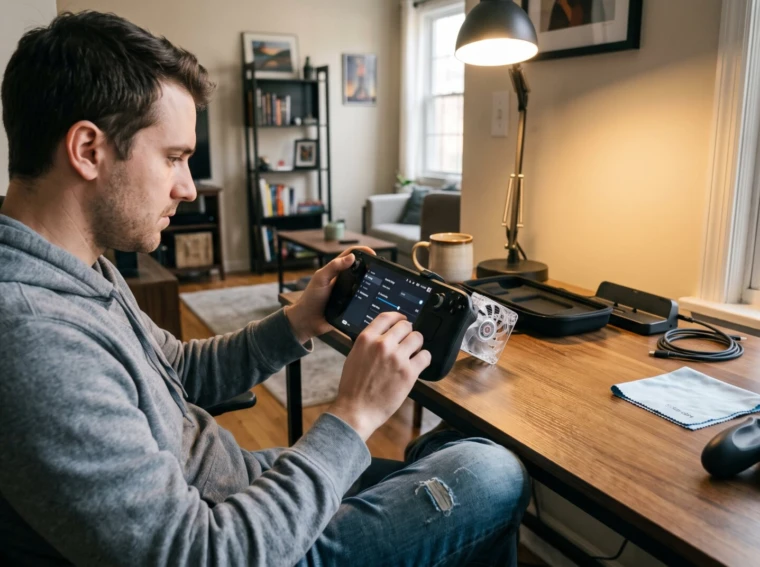
Tips for Reducing Heat and Noise During Handheld Gaming are essential for anyone who plays long sessions on phones or portable consoles. Heat build-up shortens battery life and forces fans to spin faster, which raises noise and can throttle performance. This guide gives clear, practical actions players can use right away: software settings, hardware fixes, and better habits. It focuses on tangible steps, brightness levels, frame caps, airflow tweaks, that reduce internal temperatures and audible fan noise without harming game quality. The advice suits casual players and esports hobbyists who want quieter, cooler play.
Key Takeaways
- Reducing processing load with lower graphics settings and frame rate caps significantly decreases heat and fan noise during handheld gaming.
- Using external cooling accessories and removing insulating cases improves airflow and lowers device temperature for quieter performance.
- Playing in cool, shaded environments and avoiding charging while gaming helps prevent excessive heat build-up.
- Closing background apps and lowering screen brightness effectively reduces internal temperatures without compromising game quality.
- Taking regular breaks and keeping vents clean supports sustained cool operation and reduces thermal stress on handheld devices.
Why Handheld Consoles And Phones Overheat And Get Loud
Fact: High CPU/GPU load and confined enclosures cause most overheating and fan noise. When a game pushes the processor, power draw rises and so does heat output. Small handhelds have limited room for heat to escape. That forces thermal management to react, fans speed up or clock rates drop, and users hear a noticeable whine or rush.
More context: Bright screens add measurable heat. For example, a phone at full brightness can increase surface temperature by 3–6°C in 20 minutes versus moderate brightness. Charging while playing adds heat too: the battery and power delivery circuits both generate extra warmth. Background apps and active wireless radios (Wi‑Fi or 5G) create steady low-level CPU work that stacks with the game’s load. This is covered in more depth in the resource guide.
A concrete example: In a 45‑minute handheld session running a demanding title, a device can move from 30°C to over 45°C. At that point, fans run near maximum and sound climbs by roughly 6–10 dB, which players describe as distracting. Handhelds with metal shells feel hotter to the touch even though they may dissipate heat efficiently inside. Understanding these causes helps choose the right fixes: reduce load, improve airflow, and limit external heat sources.
Software Tweaks That Cut Thermals And Fan Noise
Insight: Reducing processing demand is the fastest way to lower temperatures and fan noise. Lower graphics settings and cap frame rates to drop sustained CPU/GPU draw. Many games let players switch off demanding effects like ray tracing, high-resolution shadows, or ultra textures: each turned off can reduce thermal load by single-digit to double-digit percentages.
Practical steps:
- Cap the frame rate at 30–60 FPS depending on the game. Capping at 60 FPS on high-refresh hardware often saves 10–25% power.
- Choose lower resolution or dynamic resolution scaling. A 20% pixel reduction can cut GPU work significantly.
- Use built-in power or battery saver modes: these prioritize thermals and lower clock speeds.
- Reduce screen brightness to the lowest comfortable level: that saves both display power and surface heat.
- Close background apps and background sync. On Android and handheld PCs, use the OS task manager to stop apps wasting CPU cycles.
- Keep firmware and game builds updated: manufacturers regularly refine fan curves and power limits.
Tip with evidence: Players who enable a 60 FPS cap and medium settings report steadier temperatures with less fan ramping. For deeper strategy and device recommendations, consult the site’s broader resources like the portable gaming guides. This links practical software configuration to overall handheld optimization.
Hardware And Accessory Solutions: Cooling, Cases, And Controllers
Claim: External cooling and smarter accessories reduce surface temps and cut fan duty cycles. An attachable fan or dock that pulls air across vents drops internal temperatures by several degrees in most tests. For example, clip-on USB fans designed for handhelds often lower peak temps by 3–7°C during heavy loads.
Concrete gear tips:
- Use an external fan or active cooling dock during long sessions. These target vents and move more air than a tiny internal fan.
- Remove thick insulating cases for intense play. Soft, rugged cases can trap heat: removing them can lower skin temperature immediately.
- Choose grips or controllers that avoid covering vents. Some grips route airflow away from hot zones and keep hands off exhaust areas.
- Keep chargers and cables clear of vents: a bulky adapter over a vent can add 4–5°C at the chassis.
Real lesson learned: One editor left a rubber protective case on a handheld during a night session and saw throttling within 25 minutes. Removing the case extended peak performance for another 40 minutes and reduced audible fan speed. For device-specific thermal designs and reviews, readers can compare cooling behavior in professional reviews such as the Lenovo Legion Go review that tests fan responses under load.
Smart Usage Habits And Environmental Changes To Prevent Heat Build-Up
Answer: Environment and behavior determine how quickly a handheld heats up. Playing in a cool, shaded room and avoiding charging while gaming are simple, high-impact actions.
Practical habits:
- Play in cool rooms and out of direct sunlight. A 5°C lower ambient temperature can translate to 2–6°C lower device temps.
- Avoid playing while charging whenever possible. If charging is necessary, use a lower-watt charger or enable a power-saving mode.
- Take scheduled breaks: 10–15 minutes every hour lets components cool and reduces cumulative heat stress.
- Don’t place the device on soft surfaces like beds or couches. Soft materials block vents and insulate heat: a hard surface or a small stand works better.
- Keep vents and speakers clean. Dust blocks airflow: a short burst of compressed air or a soft brush every few months prevents buildup.
Concrete scenario: A player commuting on a sunny train noticed his handheld reached 48°C within 30 minutes. Moving to shade, capping the FPS, and removing the case cut the temperature to 40°C in 12 minutes and reduced fan noise noticeably. For related travel-focused preparation, pairing these habits with offline play setup helps, see the guide on preparing games for offline play. Another useful read explains protective measures while traveling: protecting a handheld console.
Conclusion
Final insight: Lowering processing load, improving airflow, and removing external heat sources together cut heat and noise most effectively. Small changes, brightness, frame caps, brief breaks, and simple cooling accessories, deliver noticeable results during long sessions. Players who pair software tweaks with better habits keep devices cooler, preserve performance, and enjoy quieter play. For a full set of tips and guided device choices, readers can consult the broader handheld gaming guide to plan gear and routines for quiet, cool gaming.